
Creating authentic, high-impact content is one of the best ways for athletes, musicians, artists, and other creators to grow their audiences and earn directly from fans.
But doing that takes time. A lot of it. You need time to plan, organize, and create content, not to mention time to respond to fans and truly connect with your fanbase. That all competes with the rest of your life: training, rehearsals, travel, performances, gamedays, and recovery.
At the same time, fans want meaningful content, more access, and deeper connections with creators. (And they’re willing to pay more for it.)
So how can content creators and professionals meet this demand without getting overwhelmed?
More and more, the answer is using artificial intelligence (AI) as a creative partner. Modern creators use it not to manage emails or calendar appointments, but to plan better, create more consistently, and stay connected with fans even on their busiest days.
In this article, we walk through how to use AI as a personal assistant in content creation—looking at ways creators on Fanvue use it to support their creativity and connect more deeply with fans.
Connect With and Monetize Your Fanbase on Your Terms
The Savvy Creator’s AI Workflow: Daily Use Cases
There are countless ways to use AI in content creation, but not all of them are equally effective (or enjoyable). That’s why we recommend creators focus on 3 areas where AI is most helpful: planning, creation, and engagement.
Ideating and planning content
Coming up with content ideas—and then organizing them into a calendar—is one of the biggest challenges for creators. It’s that moment when you look at a blank page and don’t know how to get started, and it rarely leads to anything good.
Fortunately, AI can be a huge help. Give it enough context about who you are, what you do, and who you create for, and it can turn your rough thoughts into a steady stream of content ideas.
Here are a few ways you can use AI to help you plan content:
Brainstorm ideas
Below is a prompt you can use in ChatGPT, Claude, or a similar tool to generate ideas and start creating a content plan. Update the placeholders with your real goals, interests, and schedule:
I’m a [profession / creator type], which means I spend most of my time [what your day-to-day actually looks like].
The main things that drive me to do what I do are [your personal motivations, values, or long-term goals]. As a professional, I want to [what you hope to achieve in your field]. Outside of that, I’m also really interested in [interests, passions, or obsessions, even if they’re unrelated to your work].
Most of my fans are [how you’d describe them as people: age range, mindset, culture, lifestyle]. They follow me mainly because [what they get from you: access, inspiration, skill, honesty, entertainment, perspective, etc.]. Lately, they’ve been especially interested in [topics, moments, or themes fans are responding to right now], and they often ask me about [common questions or recurring comments].
I want this content to help [primary goal: deepen connection / grow audience / monetize / support a release or event], and ideally also [secondary goal(s), if any]. The overall tone I want to lean into is [e.g., intimate, playful, raw, educational, aspirational].
I’m comfortable creating [formats you enjoy or are good at], and less comfortable with [formats or topics to avoid]. Realistically, I have about [time] to spend on each piece of content.
Using AI as a creative partner—not an admin—help me brainstorm specific, original content ideas organized by [formats: video, audio, posts, images, live, etc.] and [content types: behind-the-scenes, personal stories, fan interaction, skill/process, opinions, exclusives, etc.].
Each idea should clearly explain why my fans would care, feel human and personal, and be realistic for me to create consistently.
Present the ideas in a structured table that includes the following columns: content type, format, idea, why, effort level, content level (public, private, paid), and platforms. Where possible, show how one moment can generate multiple posts. Organize posts by [day of the week and/or level of effort or energy].
What makes this prompt work is that it offers you plenty of space to create ideas that are unique to you and your audience, which is where most creators fail when using AI to brainstorm content. Plus, the final sentence ensures you get a table you can drop straight into a simple content planner like Notion or SocialBee.
Outline videos
If you’re new to making video content, it can take a while to get comfortable writing scripts and shaping a clear story. AI can help with that, as long as you don’t ask it to generate the whole thing for you.
The prompt above works because it’s for a different use case: You want to generate a big list of content ideas from the same information. But when you want to create a single video, long prompts (like this ChatGPT video script prompt shared on Reddit) don’t work as well. That’s because they force AI to guess too much at once.
Instead, treat AI like your collaborator and talk through the video you want to create. Here’s a prompt you can use:
To do this, let’s have a conversation about what I want to create, why I’m creating it, what I want to achieve, what I want my fans to see and feel, and how it relates back to my own career and journey as a professional.
Ask me just one question at a time, and keep going until you have everything you need to know, including length, style, content, location, and more. Help me find the right angle to make it meaningful and connect it with my values, my mission, and my day-to-day life.
After about 15–20 questions, you’ll have the bones of a script and/or video storyboard, which you can then edit yourself or continue to work on with AI.
Schedule time for content creation
Unlike office workers, you don’t work a rigid 9-to-5 schedule. Your life revolves around training, rehearsals, studio time, travel, games, or events, and one day can look totally different from the next.
Even so, the same tools office workers use to organize their work can help you make time for content creation and fan engagement. Specifically, we’re talking about AI-powered calendars.
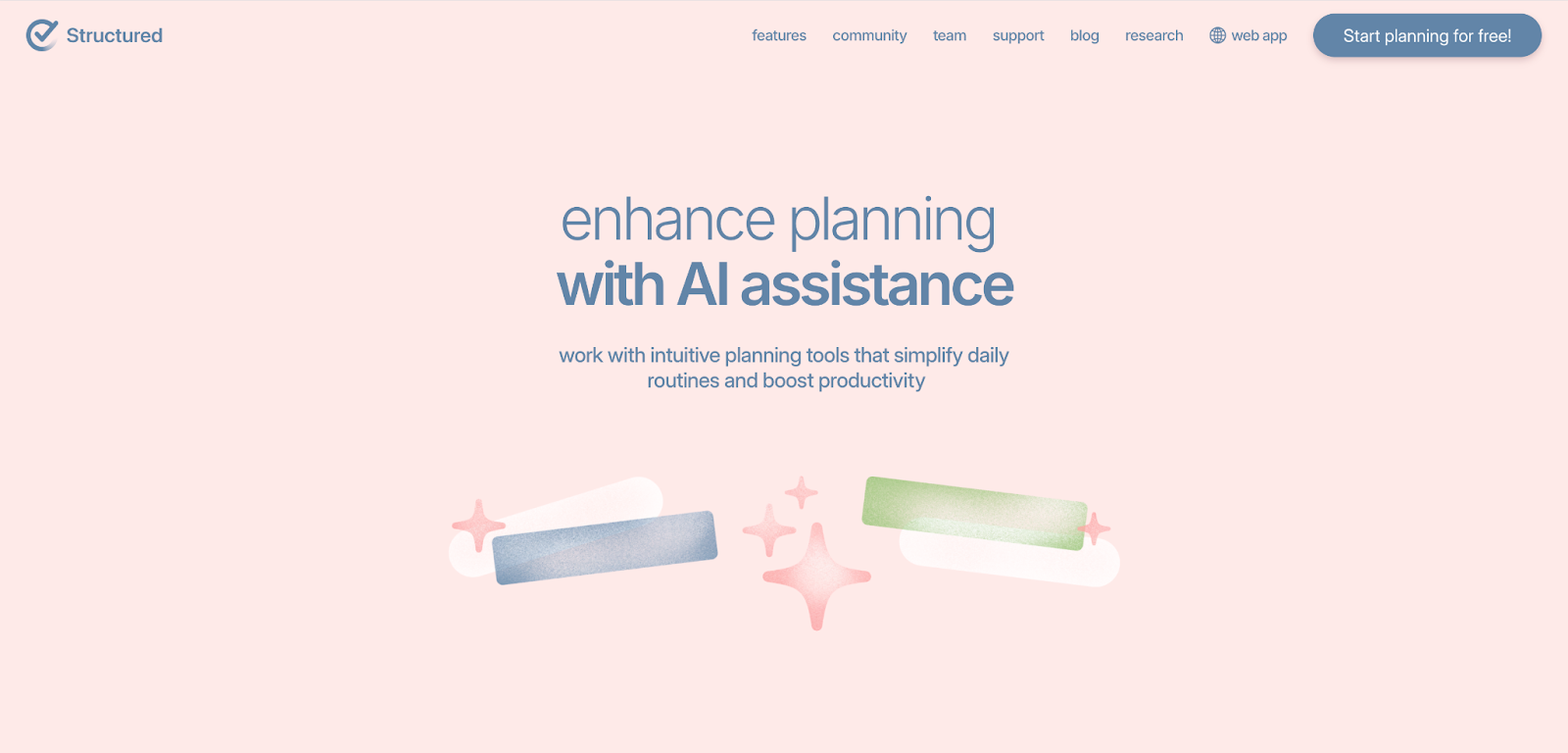
Tools like Skedpal and Structured take a list of things you want to get done—writing scripts, recording content, interacting with your audience—and automatically fit them around what’s already on your calendar. You’ll get clear time blocks (e.g., 2pm–5pm) set aside for content, instead of having to squeeze it in whenever you have a spare moment.
You’re probably already using a standard calendar for your work. Athletes keep track of training schedules and matches. DJs, musicians, and singers do the same with events, songwriting, and recording. Models and actors have go-sees, casting calls, and photo shoots to attend, and artists need to track their studio time and exhibitions.
Treating content the same way helps it stop feeling optional—because it isn’t. To genuinely connect with fans, content has to show up in your day like any other responsibility.
Creating and refining content
Over the last few years, we’ve seen creators use generative AI—such as ChatGPT, Claude, and Gemini—and other AI tools to create and refine content more effectively. Below are a few ways you can, too. (The last one is our favorite!)
Write captions and hooks
On public platforms like Instagram and TikTok, the captions and hooks that accompany your posts hold a ton of weight. They influence the algorithm, which affects how your content is distributed. In other words, they’re often the difference between someone stopping to engage with your content or scrolling straight past it.
Getting these right is important, but not always easy. Knowing what you want to say doesn’t automatically mean you know how to say it. Tools like ChatGPT and Claude take the stress out of this step by helping you get what’s in your head onto the screen.
You can use the prompt below to start generating captions and hooks with AI, then tweak the output until it sounds like you. This works with images only for now, though, since ChatGPT, Claude, and Gemini can’t watch videos yet.
My audience is mainly [who they are and how they relate to you], and I want to reince [e.g., connection, excitement, mystery, trust, familiarity, etc.]. Make it personal and don’t invent meaning. Avoid [emojis, hashtags, phrases, etc.].
Give me 3–5 natural caption options that stop the scroll without forcing it.
Create and edit images
Even with dedicated time to create content, it’s not always realistic to take new photos every time you want to share something with fans. That’s where AI-powered image generators come in handy.
There are a few options on the market, but Fanvue’s AI Image Generator is one of the easiest to use and gives realistic results. It lets you create lifelike images of yourself—based on your own photos—in different settings, all within the Fanvue app.
You can do it in 3 simple steps:
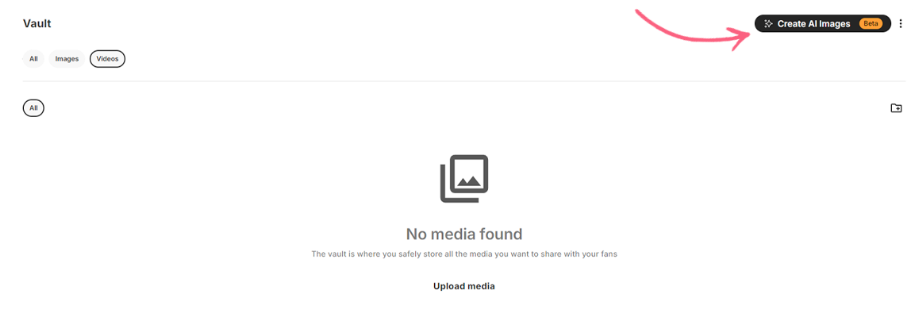
- Access your Vault and select “Create AI Images.”
- Upload your photos to train the AI. This takes a few minutes, and you’ll get a notification when it’s done.
- Select from one of the scenes, such as “post-workout flex,” “confident skyline pose,” and “bustling Times Square.”
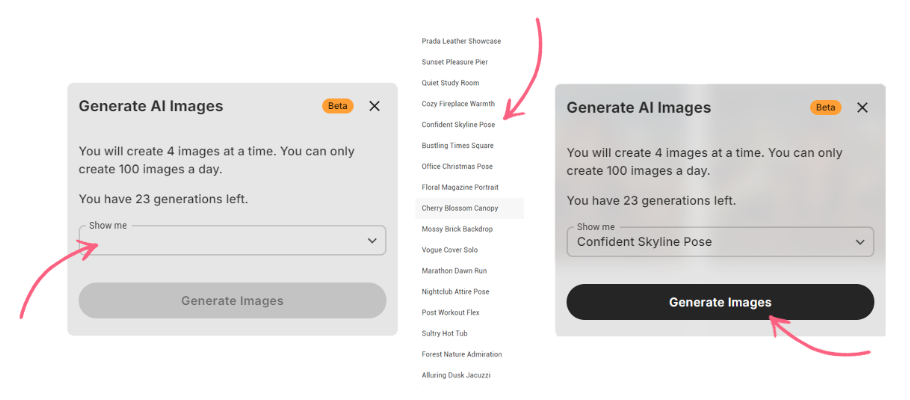
The output quality is always high, and you can create up to 100 images a day—plenty of room to experiment with different looks, themes, and settings.


While Fanvue doesn’t support AI image editing just yet, there are some good tools available—including Google’s Nano Banana (built into Gemini Pro) and ChatGPT 5.2.
Any images you create or edit outside Fanvue can be uploaded back into your Vault and shared with your fans as usual.
Repurpose existing content
Your best-performing posts are usually the ones you put the most of yourself into. They take time, energy, and attention—and while that effort is worth it to connect with fans, it’s not something you can realistically do every day. Repurposing your content is a great solution. You can take one strong post and turn it into several pieces across different formats, without having to start from scratch every time.
And AI makes this much faster and easier. It helps you get more out of your strongest content without losing any of its authenticity, originality, or creativity.
Here are some top tools creators on Fanvue use to repurpose their content:
Building deeper fan connections with Fanvue
Fans today are hungrier than ever for personal replies, thoughtful updates, and moments of access that feel genuine. But as your fanbase grows and your schedule remains as busy as ever, connecting with fans one-on-one becomes harder to sustain.
AI can help you meaningfully engage with fans at scale. This is one area where Fanvue really shines.
At Fanvue, we believe fan interactions should always feel personal, intentional, and human, and a busy schedule shouldn’t stop real connections from starting and growing. Our AI tools help you show up for your audience in ways that still feel like you—even when direct contact isn’t possible.
Here’s how:
AI Messaging for fast, personalized responses
Replying to messages is one of the most important parts of fan engagement. But it’s also one of the most time-consuming. Fanvue’s AI Messaging tools help take some of that weight off your plate.
With a quick setup, you can start using AI-assisted messaging across Fanvue for things like:
- Welcoming new followers
- Handling cancellations and subscriptions
- Acknowledging purchases
- Staying engaged with new and long-term supporters alike
Our AI considers each fan’s history, including how long they’ve supported you and what you’ve talked about, then uses that information to personalize messages.
AI Voice Notes and Calls for personal moments at scale
Fanvue also supports AI Voice Notes and AI Voice Calls for fans who want an even closer connection.
You can create a voice from scratch, or you can clone your own so AI-generated audio matches the voice fans already know from your content.
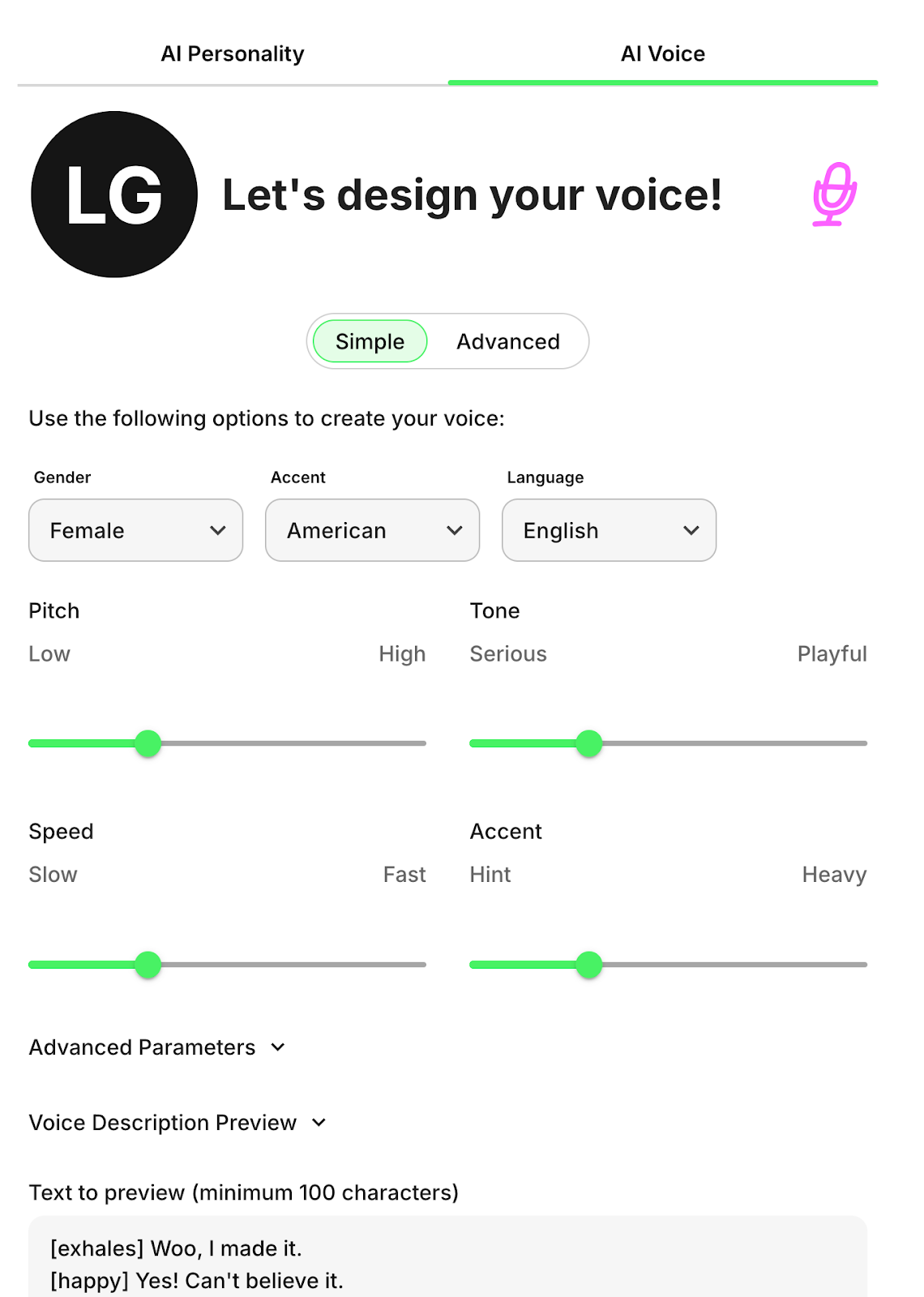
When designing your voice, you’ll first set your gender, accent, and language, then adjust the intensity of your accent and your pitch, speed, and tone (from serious to playful).
The Advanced voice setting also lets you capture different moods (such as curious, sarcastic, surprised, and excited) so calls and notes feel natural, not flat. Feel free to skip any that don’t really apply to you.
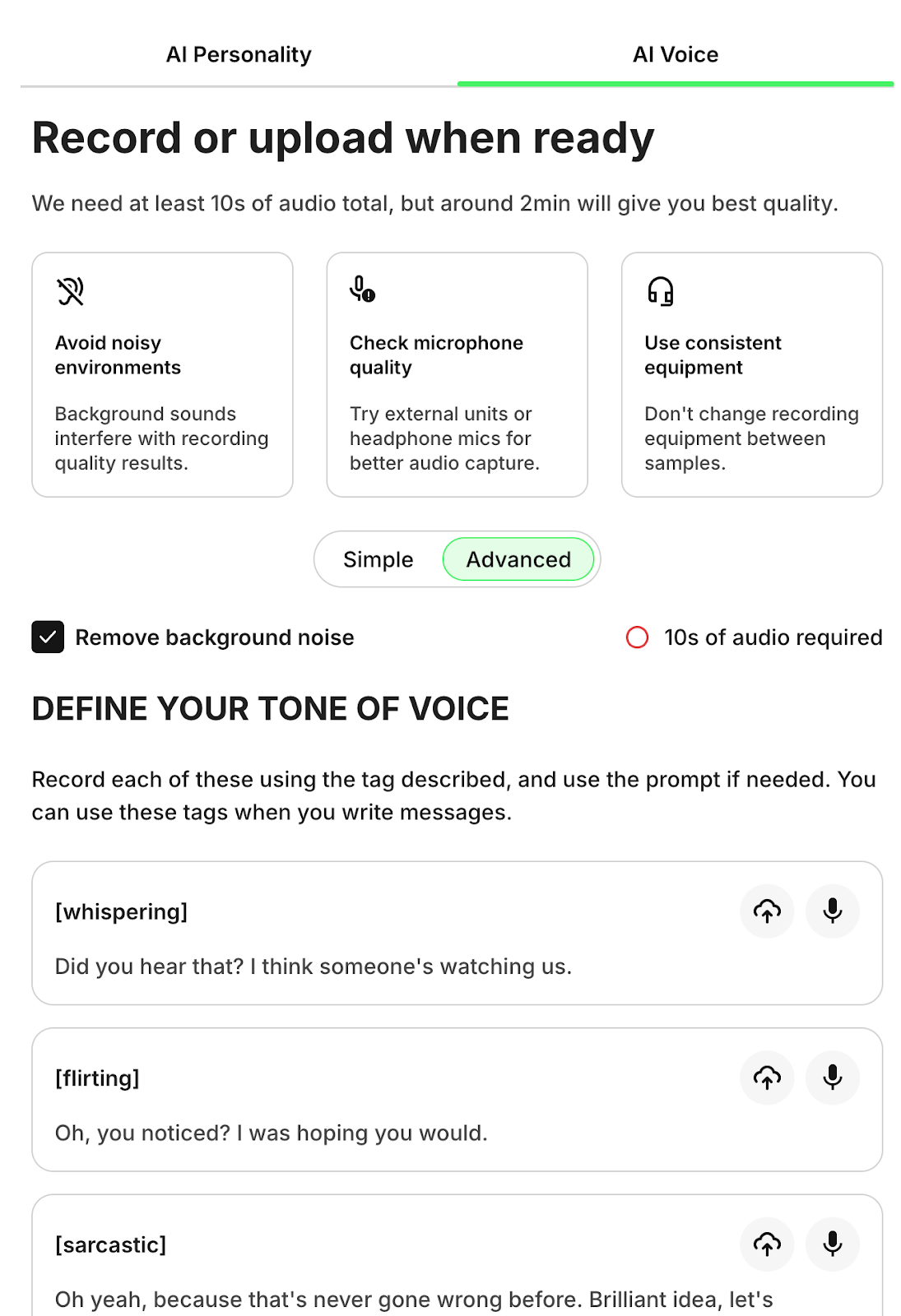
Importantly, Fanvue is transparent about how AI is used in Voice Notes and Voice Calls. Fans are always told whether they’re hearing your real voice or an AI-generated one, which helps build trust and keeps interactions honest.
The Key Takeaway
Whether you’re a full-time creator or a professional using content to reach fans, AI can support the entire process: from planning and creating content to engaging with your audience.
Fanvue has built-in AI tools that make it easy to interact with your fanbase during training, travel, events, and beyond—so your relationships don’t disappear when your days get busy.
Earn From Your Fanbase Faster With Fanvue, the Number-One AI Monetization Platform for Creators